Equalizer- Bass Booster&Volume
- 4.8
- Rating
- 5.00M
- Installs
- Free
- Price
 Analysis by App-foxy
I tried Equalizer- Bass Booster&Volume as a straightforward way to make phone audio more enjoyable, and my first impression was that it aims for a very specific kind of convenience: quick sound adjustment without asking me to replace my music player. It belongs to the Music & Audio category, is made by Easyelife, and is available free of charge for Everyone. That combination makes it easy to consider if your phone sounds thin, quiet, or simply less lively than you would like.
The app has a strong public reception, with a 4.8 average from around 63 thousand ratings and more than 5 million installs. Those figures do not automatically make it right for every listener, but they do suggest that its simple idea connects with a large audience. I see it as a practical tool for people who want more control over everyday listening rather than a replacement for a full recording or mixing setup.
How the current version fits into everyday listening
The current version is 2.5.9, and the app is designed for devices running Android 6.0 or newer. In use, the most important thing is not the label “bass booster” by itself, but the ability to shape the balance of music, videos, podcasts, and other audio played through a phone. A small adjustment can make a noticeable difference when the default output feels flat, especially through inexpensive earbuds or a phone speaker.
You May Also Like

 Blood Strike: 2.5 Anniversary
Blood Strike’s Loadouts Turn Every Drop Into a Tactical Gamble
A close look at Blood Strike’s custom loadouts: how fast access to signature weapons reshapes its battle royale rhythm, rewards preparation, and narrows the gap between fights.

 Pandora - Music & Podcasts
Pandora’s Music Is Easy to Start, but Harder to Recover
Pandora’s strength is its low-effort path from a seed to a station. Its weak spot is how much confidence it asks you to place in connection, setup, and quiet recovery.

 8 Ball Pool
 Is Built on Rivalries, Rematches, and Routine
A close look at the rivalries, rematches, shared routines, and unanswered safety questions that turn a quick pool match into a persistent mobile community.

 Samsung Music
’s Quiet Strength Is Playing What You Already Own
Its reach comes less from spectacle than from dependable access to a personal library. That simplicity is both the app’s strongest retention engine and its ceiling.

 AccuWeather: Weather Radar
AccuWeather Review: A Quick, Clear Forecast for Everyday Decisions
For everyday plans, the best forecast is the one you can understand quickly. AccuWeather makes rain timing, radar, and local conditions easy to act on, with a few trade-offs.

 Hill Climb Racing
Why Hill Climb Racing Still Turns Crashes Into One More Run
A tiny car, a bumpy hill and one more upgrade: Hill Climb Racing keeps resurfacing because its simple chaos makes every near-miss feel personal.
More From Our News Desk



I would start with a conservative change rather than immediately pushing every control to its maximum. Extra bass can make a song feel fuller, but too much quickly turns kick drums into a blur and can make voices harder to understand. The best results usually come from treating the app as a correction tool: add a little weight where the sound is weak, then stop before the rest of the mix becomes muddy.
The useful strength here is immediate control, not studio-level precision. That distinction matters. Someone who wants a few practical adjustments while commuting, watching a clip, or listening in a room may appreciate this approach. Someone who needs exact frequency work, carefully saved production presets, or dependable behavior across professional audio software should look toward a more specialized equalizer instead.
A sensible setup for music, speech, and video
For music, I found it more helpful to judge the result with several familiar tracks instead of one song. A bass-heavy track can make an aggressive setting seem exciting, while a vocal recording may reveal that the same setting has gone too far. Switching between different styles is a useful reality check, because a setting that sounds impressive for a short demo may become tiring during a longer listening session.
For podcasts and spoken video, I would avoid chasing bass altogether. Clear speech generally benefits from restraint. If the app offers more control than you need, leave most of it near its neutral position and make only the smallest change that solves the problem. This is one of the less obvious trade-offs: an audio enhancer can improve weak output, but it cannot restore detail that was never present in the original recording.
Phone speakers also deserve realistic expectations. Boosting low frequencies does not turn a small speaker into a large one. In some cases, the phone may sound louder or more energetic, but the physical limits of the speaker remain. With headphones or earbuds, the effect can be easier to notice because those devices are better suited to reproducing the lower part of the sound range.
Where it is most useful in a normal day
A realistic example is listening to a playlist while cooking. The phone sits several feet away, the room is noisy, and the default sound lacks presence. I would use a modest enhancement to make the music easier to follow, then lower it again when switching to a spoken program. That workflow is more practical than searching for a perfect setting once and leaving it active for everything.
Another good use is checking whether the problem is the recording or the phone’s output. If a familiar song sounds weak through the built-in speaker but improves with a careful adjustment, the app can help compensate. If the result becomes distorted as soon as the volume rises, the better solution may be different headphones, a cleaner source, or lower playback volume. The app is useful for tuning, but it is not a repair service for damaged hardware.
I also see value for people who share a phone with family members. One listener may prefer a warmer, heavier sound, while another may want speech to remain crisp. A quick adjustment can be less frustrating than changing the entire phone’s audio habits. Still, I would pay attention to whether the setting remains active when moving between apps, because audio tools can behave differently depending on the player and the device.
What the app’s development tells me
Easyelife has kept the product in an actively recognizable form, and version 2.5.9 gives existing users a clear current point of reference. The app was released on December 17, 2022, so it is not a brand-new experiment. I would interpret its evolution cautiously: the continued presence of a current version is encouraging, but a version number alone does not tell me that every phone, headset, or media player will behave identically.
That is especially important with audio utilities. Their results depend on the Android device, the audio route, the headphones, the media player, and sometimes the way another sound effect is already processing the signal. A change that feels excellent on one phone may be subtle on another. I would therefore judge an update by listening rather than assuming that a newer version automatically means a stronger effect.
For someone already using an older release, the practical question is whether the present version feels stable with their usual listening routine. I would test music, spoken audio, and video separately after updating. If one category sounds worse, reducing the effect may solve the issue without abandoning the app. The important lesson is that equalization is personal: the “best” setting is tied to your equipment and hearing preferences, not just to the app version.
How it compares with the usual alternatives
The closest alternative is the audio control already built into a phone or music player. Built-in tools often have the advantage of being closely integrated with that particular device or service. They may be more predictable for one app, and they avoid adding another control layer. On the other hand, a dedicated utility can be more convenient when the phone’s own options are too limited or difficult to reach.
Music players with their own equalizer can be a better choice if nearly all of your listening happens inside one service. They may let you adjust music without affecting other audio, which is useful when you want a special setting for songs but normal sound for calls or video. Equalizer- Bass Booster&Volume makes more sense when you want a broader, simpler adjustment and do not want to depend on one specific player.
There is also a difference between a general enhancer and a serious audio tool. Advanced alternatives may provide deeper control, more detailed presets, or better separation between apps. That extra flexibility can be worthwhile for enthusiasts, but it also creates more opportunities to make a poor setting. I prefer this app for quick experimentation and everyday correction, not for demanding sound design.
External hardware is the other major alternative. Better earbuds, headphones, speakers, or a small amplifier can improve the source of the problem rather than processing it afterward. If your current equipment is uncomfortable, distorted, or badly fitted, software changes will only go so far. In that situation, spending time on the app may be less effective than improving the physical audio setup.
Small techniques that make the results better
My first tip is to adjust at a comfortable listening level. Very loud playback can make bass and treble seem more impressive than they really are, so I would compare changes at the volume I normally use. This avoids choosing a setting that sounds exciting for a minute but becomes harsh during a long session.
My second tip is to test with a voice recording as well as music. A setting that adds pleasant warmth to instruments may cover consonants in speech. If voices become dull or distant, reduce the low-end emphasis before increasing overall volume. This simple test catches a problem that a music-only check can miss.
My third tip is to change one thing at a time. Raising bass, increasing volume, and altering the wider balance together makes it difficult to know which adjustment helped. I would make a small change, listen to a familiar section, and then decide whether to keep it. That slower method usually produces a more comfortable result than chasing an instant dramatic effect.
A fourth useful habit is to recheck the setting after changing output devices. Earbuds, wired headphones, Bluetooth speakers, and the phone’s own speaker each emphasize sound differently. A profile that works on one may be excessive on another. Treating the setting as portable can lead to distortion, so I would regard each audio route as a fresh test rather than assuming one adjustment fits all.
Where the experience can fall short
The biggest limitation is that sound enhancement is not equally dependable across every Android setup. The app may be easy to use, but the final result still depends on how the phone handles audio processing. A user may notice a strong effect in one player and a weaker one elsewhere. That is not necessarily a fault in the control itself, but it does make the experience less universal than the simple description suggests.
Another concern is the temptation to use volume boosting as a substitute for clarity. Louder audio often feels better during a quick comparison, yet it can expose distortion and become uncomfortable over time. I would be careful with long listening sessions and avoid assuming that the highest available level is the most useful one. If clarity disappears when the sound is pushed, backing off is the better choice.
People who want a carefully managed audio environment may also find the app too broad. If you need different treatment for every individual player, detailed automation, or professional-grade control, a player-specific or advanced audio solution may be a better fit. This app’s appeal is its accessibility, and accessibility usually comes with fewer specialized options.
I would also skip it if your main complaint is poor hardware. A damaged speaker, loose connection, weak Bluetooth device, or badly sealed earbud cannot be reliably corrected through equalization. Software can reshape a signal, but it cannot make a failing component behave like a good one. In that case, diagnosing the equipment first will save time.
Who should install it and who should look elsewhere
I would recommend trying it if you listen on Android, want a free way to experiment with sound, and regularly feel that your phone’s output needs more body or presence. It is particularly suitable for casual listeners who do not want to learn complicated audio terminology. The Everyone content rating also makes it broadly approachable for general household use.
I would be more selective for someone who listens mainly to classical music, acoustic recordings, or carefully mastered albums. That does not mean the app cannot help, but subtle recordings can lose their natural balance quickly when enhancement is applied too strongly. A neutral setting, or the equalizer inside a trusted music player, may preserve the original character better.
It is also not my first choice for a producer, DJ, audio editor, or enthusiast who needs repeatable technical control. Those users generally benefit from tools built around detailed monitoring and precise adjustment. Here, the better question is not whether the app has enough power, but whether its quick approach matches the job.
What existing users and newcomers should watch
New users should watch how the app interacts with their normal audio path. Test the phone speaker first, then the headphones you use most often, and finally a spoken source. If the result is consistent and comfortable, keep the adjustment modest. If it changes noticeably between apps, use the tool only where it behaves predictably rather than forcing one setting everywhere.
Existing users should watch for changes after moving to version 2.5.9, especially if they rely on a particular player or Bluetooth device. I would compare the same familiar track before and after any update, using the same output device and approximate volume. That gives a more meaningful impression than judging from memory.
Future expectations should remain practical. I would value improvements that make behavior more consistent across devices and media players, because reliability matters more than an exaggerated effect. I would also prefer any evolution to preserve the app’s approachable character rather than burying a simple adjustment behind layers of technical controls. Those are expectations, not promises, but they are the areas that would matter most in everyday use.
My final take after using it
Equalizer- Bass Booster&Volume is a useful free option when your goal is simple: make ordinary phone audio feel better with a few careful adjustments. Its popularity, current version, and broad device compatibility make it easy to try, while Easyelife’s focused approach keeps the idea understandable. I like it most as a small correction tool for imperfect speakers, basic earbuds, and changing listening situations.
My recommendation comes with one rule: use restraint. A little extra weight can improve a thin recording, but heavy processing can hide vocals, introduce distortion, and make long listening tiring. If you remember that the app changes the signal rather than upgrading the hardware, its strengths become clearer.
For casual Android listening, it is worth trying; for precise audio work, choose a more specialized alternative. I would install it when I wanted a free, accessible way to experiment, keep the settings conservative, and judge it with both music and speech. That is where this app feels most honest and useful: not as a miracle upgrade, but as a practical volume and sound-shaping companion for everyday audio.
FAQs for Equalizer- Bass Booster&Volume
01What is Equalizer- Bass Booster&Volume, and what does it do?
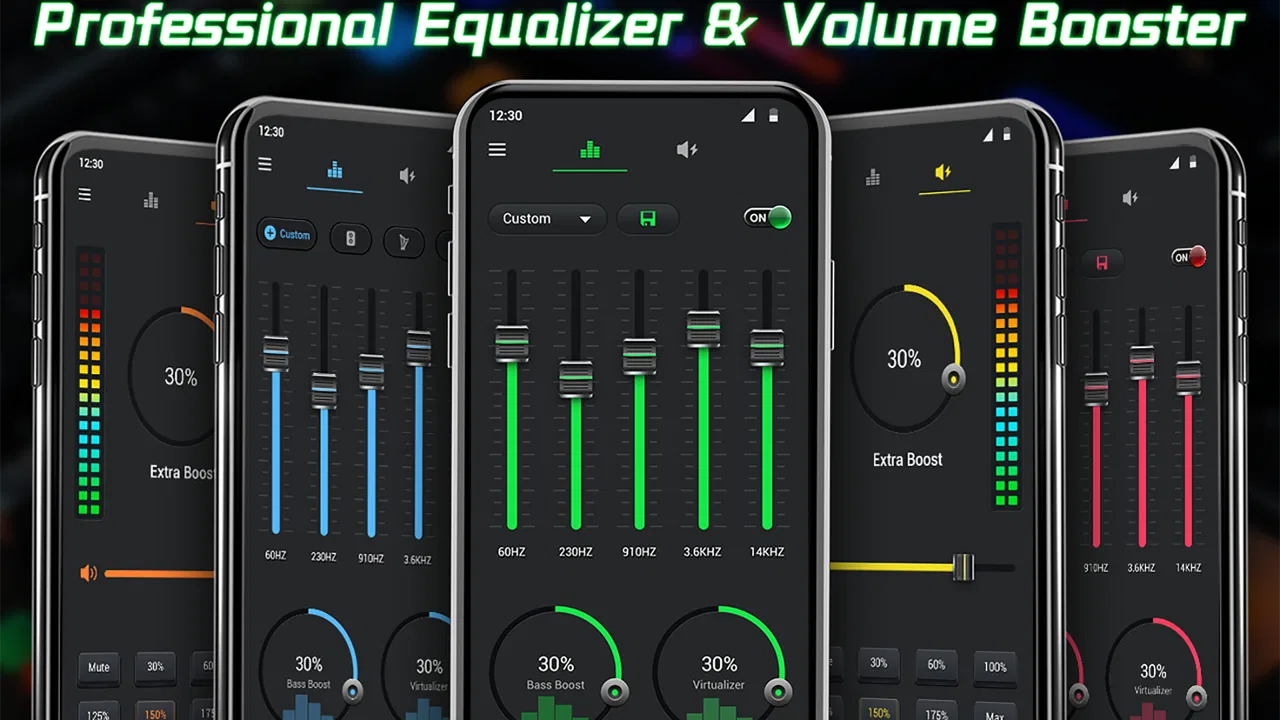
Equalizer- Bass Booster&Volume is an audio-enhancement app designed to change the way music and other media sound on your device. It typically provides an equalizer with adjustable frequency bands, bass amplification, volume controls, and sound presets. After testing the main controls, I found it most useful for making headphones or small phone speakers sound fuller, although the final result depends heavily on your device and audio source.
02Can Equalizer- Bass Booster&Volume improve bass and overall sound quality?
The app can make bass more noticeable and help adjust treble, vocals, and general loudness through its equalizer and booster controls. However, it cannot create audio detail that is missing from the original recording or overcome poor-quality headphones. Increasing bass or volume too much may cause distortion, so it is better to make small adjustments and compare the enhanced sound with the original before choosing a permanent preset.
03Does Equalizer- Bass Booster&Volume work with all music and media apps?
Compatibility can vary depending on the Android version, device manufacturer, audio player, and whether another equalizer is already active. In my experience, apps of this type generally work best with locally played music and common streaming players, but some services may limit audio processing or reset the effect when playback changes. Users should test their preferred apps rather than assuming every source will respond identically.
04Is Equalizer- Bass Booster&Volume safe to use at high volume levels?
The application itself only changes audio processing, but boosted volume and bass can make listening levels dangerously loud. Prolonged exposure to high volume may damage hearing, while excessive amplification can also produce clipping, distortion, or unpleasant speaker vibrations. I recommend starting with moderate settings, avoiding maximum volume, and reducing the level immediately if the sound becomes harsh or your device gets unusually warm.
05Does Equalizer- Bass Booster&Volume require payment, and are there ads or extra permissions?
The availability of free features, advertisements, premium controls, and subscription options may depend on the version downloaded from the store. Before installing, check the current Google Play listing for in-app purchases and the developer’s privacy information. Also review the permissions requested during setup. An audio equalizer should not normally need access unrelated to audio, so unexpected permissions deserve careful consideration before continuing.
Pros
- Boosts bass and volume with simple
- easy-to-use controls.
- Preset sound modes make quick audio adjustments convenient.
- Works well with headphones
- speakers
- and many music players.
- Compact interface is easy to navigate on smaller phone screens.
- Can improve clarity and impact for music
- videos
- and podcasts.
Cons
- Excessive amplification may cause distortion or reduce audio quality.
- Results vary depending on the phone
- headphones
- and media app.
- Some advanced features may require in-app purchases.
- Higher volume levels can damage hearing or strain connected speakers.
- May continue affecting audio after closing until settings are reset.

Equalizer- Bass Booster&Volume
Gallery